Use Google to learn a Quick Facts each day, Go to www.google.com and search "Fun Facts", you will get some interesting information to read. The result could be any fun facts from any of the information in this world or out of the world. Give it a try, you will be surprised with some of the facts.
Will Force Touch / 3D Touch Work on iPhone 6?
Force Touch / 3D Touch
The Simplest Answer to the question will the force touch & 3D touch work on iPhone 6? is Big "NO". But why ForceTouch & 3D Touch doesn't work in iPhone 6, isn’t just a software change?
Force touch is not just a software change, It’s a hardware change. This is the reason iPhone 6s is little thicker than iPhone 6.
Look at the Image below to find the difference in Hardware Specification for iPhone 6s and iPhone 6
iPhone 6s Specification:
iPhone 6 Specification:
Posted in 3DTouch, Apple, ForceTouch, iPhone
Developing your first Node.js Socket io application - Learn Simple Multichat example in Node.js and socket.io.
Topics
i) Importing libraries
ii) Create Server and Handle Request
iii) Play with Socket.io to do MultiChatting
2) Develop Webpage with Socket Javascript
3) Download Project here
1) Code your Server.js - Node.js main file
i) Importing libraries
var http = require("http");
var url = require('url');
var fs = require('fs');
var io = require('socket.io');
ii) Create Server and Handle Request
var server = http.createServer(function(request, response){
var path = url.parse(request.url).pathname;
console.log('Path='+path);
switch(path){
case '/':
fs.readFile(__dirname + "/index.html", function (error, data) {
if (error) {
response.writeHead(404);
response.write("opps this doesn't exist - 404");
response.end();
}
else{
response.writeHeader(200, {"Content-Type": "text/html"});
response.write(data, "utf8");
response.end();
}
});
break;
case '/socket.html':
fs.readFile(__dirname + path, function (error, data) {
if (error) {
response.writeHead(404);
response.write("opps this doesn't exist - 404");
response.end();
}
else{
response.writeHeader(200, {"Content-Type": "text/html"});
response.write(data, "utf8");
response.end();
}
});
break;
default:
console.log(path +"- Not found");
response.writeHead(404);
response.write("opps this doesn't exist - 404");
response.end();
break;
}
});
server.listen(8001);
iii) Play with Socket.io to do MultiChatting
var serv_io = io.listen(server);
var textarea="";
var name="";
serv_io.sockets.on('connection', function(socket){
//send data to client
setInterval(function(){
socket.emit('date', {'date': getCurrentTime()}
);
}, 1000);
socket.on('client_data', function(data){
textarea=data.textarea;
name=data.name;
console.log("name="+name);
//socket.emit('textarea', {'textarea': data.textarea});
emitData(socket);
});
});
function emitData(socket){
socket.broadcast.emit('message',
{'date': getCurrentTime(),
'name' : name,
'textarea':textarea
}
);
}
function getCurrentTime(){
var d = new Date();
var curr_date = d.getDate();
var curr_month = d.getMonth()+1;
var curr_year = d.getFullYear();
var curr_hour = d.getHours()%12 +"";
var curr_min = d.getMinutes() + "";
var curr_sec = d.getSeconds() + "";
if(curr_hour.length == 1)
curr_hour="0"+curr_hour;
if(curr_min.length == 1)
curr_min="0"+curr_min;
if(curr_sec.length == 1)
curr_sec="0"+curr_sec;
//var dateString = sprintf("%2s-%2s-%s %2s:%2s:%2s ",curr_date,curr_month,curr_year,curr_hour,curr_min,curr_sec);
var dateString = curr_date + "-" + curr_month + "-" + curr_year + " " + curr_hour +":"+ curr_min +":"+ curr_sec;
return dateString;
}
2) Develop Webpage with Socket Javascript
<html> <head> <script src="/socket.io/socket.io.js"></script> <script src="https://ajax.googleapis.com/ajax/libs/jquery/1.7.2/jquery.js"></script> <style> .common{ width: 200px; height: 30px; padding-left: 10px; } #date{ color: green; } </style> </head> <body> <script> var socket = io.connect(); socket.on('date', function(data){ $('#date').text(data.date); }); socket.on('message', function(data){ message=data.textarea; len=message.length; if(len > 0){ printMessage(data.name,message); } }); $(document).ready(function(){ $('#textarea').keypress(function(e){ if ( event.which == 13 ) { message=$('#textarea').val(); len=message.length; strname = $('#name').val(); if(len > 0){ socket.emit('client_data', {'name':strname,'textarea': message}); printMessage(strname,message); } $('#textarea').val(""); } }); }); function printMessage(strname,message){ $('#messagearea').html($('#messagearea').html()+"<br/><span style='color:blue;font:18px;'>"+strname+"</span> : "+message); } </script> <div><h1>Welcome to Node.js Socket.io - Simple Multi Chat Application</h1></div> <b> Get tutorial here (Post your comments and query)</b> - <a href='http://www.coolcomputerpctricks.com'>www.coolcomputerpctricks.com</a><br><br> <b> Get Latest Code here </b> - <a href='https://github.com/karthikeyan98'>https://github.com/karthikeyan98</a> <br><br>Current Time: <span id="date"></span><br/> <input type="text" id="name" value="Guest" class="common"> - Type Name here<br/><br/> <textarea id="textarea" class="common"></textarea> - Type Message here and press Enter. <div id="messagearea"></div> </body> </html>
3) Download Project here
GitHub - https://github.com/karthikeyan98/SimpleMultiChatPost your comments and query for any help.
Posted in Coding Scripts, Funny Tricks, Internet, Linux Tricks, node.js, Programming, socket.io, Windows Trick
Develop your first Android Game
How to develop android games?
Check out this android game. Which is built using this technique.
Save Super Penguins
https://play.google.com/store/apps/details?id=com.positivesthinking.parachutepenguinsfree
Before starting the tutorial familiar yourself with android.
2. Create your Hello World Android application
https://developer.android.com/training/basics/firstapp/creating-project.html
Lets start the game development.
MainThread.java.
package com.coolcomputerpctricks.tutorialgame;
import android.graphics.Canvas;
import android.util.Log;
import android.view.SurfaceHolder;
/**
* www.coolcomputerpctricks.com
* Android Game development tutorial *
*/
public class MainThread extends Thread {
private static final String TAG = MainThread.class.getSimpleName();
// Frames Per seconds
public int MAX_FPS = 150;
private int FRAME_PERIOD = 1000 / MAX_FPS;
private SurfaceHolder surfaceHolder;
private ViewGamePlay gamePanel;
private boolean running;
public void setRunning(boolean running) {
this.running = running;
}
public MainThread(SurfaceHolder surfaceHolder, ViewGamePlay gamePanel) {
super();
this.surfaceHolder = surfaceHolder;
this.gamePanel = gamePanel;
}
@Override
public void run() {
Canvas canvas;
long beginTime;
long timeDiff;
int sleepTime;
sleepTime = 0;
while (running) {
canvas = null;
try {
canvas = this.surfaceHolder.lockCanvas();
synchronized (surfaceHolder) {
beginTime = System.currentTimeMillis();
this.gamePanel.render(canvas);
timeDiff = System.currentTimeMillis() - beginTime;
sleepTime = (int)(FRAME_PERIOD - timeDiff);
if (sleepTime > 0) {
try {
Thread.sleep(sleepTime);
} catch (InterruptedException e) {}
}
}
} finally {
if (canvas != null) {
surfaceHolder.unlockCanvasAndPost(canvas);
}
}
}
}
}
Step 2: Create a SurfaceView class that will show the game UI and controls the game.
ViewGamePlay.java
package com.coolcomputerpctricks.tutorialgame;
import java.util.Random;
import android.content.Context;
import android.graphics.BitmapFactory;
import android.graphics.Canvas;
import android.view.MotionEvent;
import android.view.SurfaceHolder;
import android.view.SurfaceView;
/**
* www.coolcomputerpctricks.com
* Android Game development tutorial *
*/
public class ViewGamePlay extends SurfaceView{
MainThread thread;
ItemImages bgImage,parachute;
int max,min;
public ViewGamePlay(Context context) {
super(context);
thread = new MainThread(getHolder(), this);
getHolder().addCallback(new SurfaceHolder.Callback() {
public void surfaceDestroyed(SurfaceHolder holder) {
boolean retry = true;
while (retry) {
try {
thread.setRunning(false);
thread.join();
retry = false;
} catch (Exception e) {
e.printStackTrace();
}
}
}
public void surfaceCreated(SurfaceHolder holder) {
Canvas c = holder.lockCanvas(null);
initializeGame(c);
drawGame(c);
holder.unlockCanvasAndPost(c);
thread.setRunning(true);
try{
thread.start();
}catch(Exception e){
e.printStackTrace();
}
}
public void surfaceChanged(SurfaceHolder holder, int format, int width, int height) {
//Surface changed
}
});
}
public void initializeGame(Canvas canvas){
bgImage = new ItemImages(BitmapFactory.decodeResource(getResources(), R.drawable.sky),0,0);
parachute = new ItemImages(BitmapFactory.decodeResource(getResources(), R.drawable.parachute),0,0);
//Random left position for the parachute
max=(int) (canvas.getWidth()-parachute.getWidth());
min=0;
Random rand = new Random();
int randomNum = rand.nextInt((max - min) + 1) + min;
parachute.setLeft(randomNum);
}
protected void drawGame(Canvas canvas) {
bgImage.drawBMP(canvas);
parachute.drawBMP(canvas);
}
public boolean onTouchEvent(MotionEvent event) {
float x = event.getX();
float y = event.getY();
if(parachute.isCollition(x, y))
{
// If player touched, reset the parachute location
parachute.setTop(0);
Random rand = new Random();
int randomNum = rand.nextInt((max - min) + 1) + min;
parachute.setLeft(randomNum);
}
return true;
}
public void render(Canvas canvas) {
parachute.setTop(parachute.getTop()+2);
if(parachute.getTop()>canvas.getHeight()){
parachute.setTop(0);
// Reset the parachute location
parachute.setTop(0);
Random rand = new Random();
int randomNum = rand.nextInt((max - min) + 1) + min;
parachute.setLeft(randomNum);
}
drawGame(canvas);
}
}
Step 3: Create a Image handler class that will help you in collision detection and loading bitmap images.
ItemImages.java
package com.coolcomputerpctricks.tutorialgame;
import android.graphics.Bitmap;
import android.graphics.Canvas;
import android.graphics.Matrix;
import android.graphics.Rect;
/**
* www.coolcomputerpctricks.com
* Android Game development tutorial *
*/
public class ItemImages {
private float width;
private float height;
private float left;
private float top;
private Bitmap bmp;
private boolean visible;
public ItemImages(Bitmap bmp,float left, float top)
{
this.width = bmp.getWidth();
this.height = bmp.getHeight();
this.bmp=bmp;
this.left=left;
this.top=top;
this.setVisible(true);
}
public void setBmp(Bitmap bmp) {
this.bmp = bmp;
}
public void drawBMP(Canvas canvas) {
if(canvas!=null && bmp!=null)
canvas.drawBitmap(bmp, left, top, null);
}
public void drawBMP(Canvas canvas,Rect src,Rect dst) {
if(canvas!=null && bmp!=null)
canvas.drawBitmap(bmp, src, dst, null);
}
public boolean isCollition(float x2, float y2) {
return x2 > left && x2 < left + width && y2 > top && y2 < top + height;
}
public float getWidth() {
return width;
}
public void setWidth(float width) {
this.width = width;
}
public float getHeight() {
return height;
}
public void setHeight(float height) {
this.height = height;
}
public float getTop() {
return top;
}
public void setTop(float top) {
this.top = top;
}
public float getLeft() {
return left;
}
public void setLeft(float left) {
this.left = left;
}
public boolean isVisible() {
return visible;
}
public void setVisible(boolean visible) {
this.visible = visible;
}
}
Step 4: Wire up your MainActivity.
MainActivity.java
package com.coolcomputerpctricks.tutorialgame;
import android.app.Activity;
import android.os.Bundle;
import android.view.Menu;
/**
* www.coolcomputerpctricks.com
* Android Game development tutorial *
*/
public class MainActivity extends Activity {
@Override
protected void onCreate(Bundle savedInstanceState) {
super.onCreate(savedInstanceState);
setContentView( new ViewGamePlay(this));
}
}
Here is the two images used in this tutorial
Download Project here
GitHub - https://github.com/karthikeyan98/SimpleGame-AndroidExamplePost your comments for any doubts and helps.
Posted in Android, Coding Scripts, Games, Google, Internet, Mobile Games, Play Store, Programming, Software
Most Difficult Hardest Android Games
1) World's Hardest Game
Description:
This is The World’s Hardest Game! Work your way through 30 incredibly hard levels, and if you can finish all of them you can compete for a spot on the world leader board!
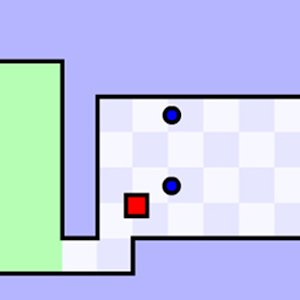
You are RED square, avoid the BLUE circles and collect Yellow circles. Once you have collected all the yellow circles move to GREEN beacon to complete the level.
Your score is a reflection of how many times you have died; the less, the better.
2) Parachute Penguins
Description:
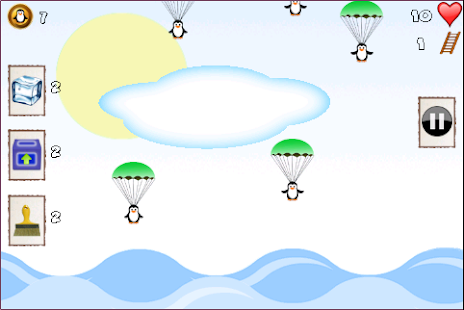
Parachute Penguins. Save Penguins from the hungry and sharp jaws of Sharks waiting at the bottom of the sea.
1) Freeze - Freeze the flappy penguins bird for short period of time in the sky and let you save the penguins easily
Frequently Bonus Powers Drop from the sky along with the the cute parachute penguins, catch Bonus Power Parachutes to increase your bonus power counts.
KidMode Suitable for your kids to play, Save flappy bird penguins by just swiping the screen. KidMode doesnt support Highscore but it has 100 Life and just swiping the screen saves the flappy bird penguins drop from parachute.
3) Hardest Game Ever 2
Description:
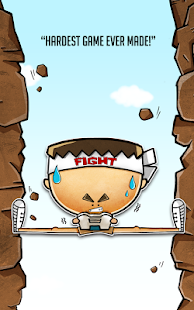
- Simple 3 Button Control
- 48 Stages with 4 Challenging Levels
- Ranking with Facebook Pals
- Simple yet addictive gameplay
- Multi-language Instructions
Posted in Android, Games, Google, Internet, Mobile Games, Play Store
Are we trusting Google too much?
1. why should chrome warn us with a message when we clear browsing history?
Whenever we try to clear browsing history, chromes tells that there is incognito mode to use, is Google worried if you clear your entire browsing history from chrome?
What does Google do with your browsing history?
Here's a clear evidence, "YouTube", Google's YouTube shows video contents relevant to our browsing history stored in chrome. that's how your information is used to make you use their product(YouTube) more than what you do normally.
you can find the difference when you go to "YouTube" home page in both conditions
1. first without browsing history - everything cleared in chrome- visit YouTube home page
2. after doing couple of Google searches, let chrome shows some history and visit YouTube, you will feel the difference
2. why should chrome has separate log in session separating it from other google products.
when you logged in chrome, also when you logged in some of other google product like gmail, when you signout of gmail,chrome logged in session wont go.chrome separate login session stores all your data ( you can control it by visiting settings, how many of us do that, what about people who doesn't have enough computer experience to change the settings ) user specific data stored in each of our google account right from browsing history to form input data's.
3. How does google map works - showing traffic information in the road we travel.
It does collect our location information including in which speed we are traveling, it collects every one who uses android mobile or signed in to google map atleast once and using some algorithm it gives back.
4. What will happen with Google Glass?
5. Not just above four items, there are lot more things.. like
Obviously, we are very much benefited and addicted to all those products, and there are ways we can control sharing our data to a certain level, but how many of us are really concerned about it, going to settings, searching where it is and switching it off?
Posted in Browser Tricks, Coding Scripts, Funny Tricks, Google, Internet, Linux Tricks, Nasty Trick, Programming, Security / Maintenance, Software, Windows Trick
Google's New Scientific Calculator
Posted in Browser Tricks, Funny Tricks, Google, Internet, Linux Tricks, Windows Trick
Google Restricts Labels in blogger (robot.txt)
Google Search restricts Labels (Categories) for all the blogs in Blogger (BlogSpot)
If you see something like this in your webmaster tools, be cool don’t worry for this.
This is because
Reason: Each Label entries are not sub pages, they are just a well framed search query
For example:
When you click the Label – Windows Trick in coolcomputricks.co.cc, the url pointing to that label is this
http://www.coolcomputricks.co.cc/search/label/Windows%20Trick
If you see this url carefully, you can see “/search/” in it, this means it is not actually a new page to be crawled by the Google search bot, it just a search query url, where all the pages yielded by this search query url is already indexed, so it just says it restricts the labels (search query url), but all the pages in your site is already indexed and included in search engine
Posted in Browser Tricks, Internet, Linux Tricks, Security / Maintenance, Windows Trick
Make Browsing safer when using Friends systems or using it in outsiders system like net cafe
What should you do to make safe browsing, when using your friends laptop or using it in any Internet center.?
What should you do to temporarily erase the trace of what you searched for?
Keep the history unchanged, but temporarily disallow saving of histories, cookies, url names and everything.
Here is what you need to do.
Almost All the browsers has a concept called Private Browsing, Private Browsing helps not to save any information like histories, form entries, username, password, cookies, and everything you browsed for, so all the browsing entries can be unsaved for that particular time of browsing
For Chrome Users
1. Click Settings ( Tool Icon on the top right corner of chrome)
2. From the drop down, select “New Incognito Window”
3. You will now see a new window with a Detective Agent Logo on Top Left Corner, where you can make private browsing, credit card transactions, experiments, research, and anything that will not saved forever
4. And when you close it, it goes normal, If you want to do Private browsing again, need to start from first
For Mozilla Firefox Users
1. Click Firefox Button on the Left top corner
2. Click “Start Private Browsing”
3. You will receive a alert box, click “Start Private Browsing” once again
4. There you go, you will now see a new window that has changed color in the Firefox Button on the Left top corner enjoy private browsing, where you can make private browsing, credit card transactions, experiments, research, and anything that will not saved forever
For Internet Explorer Users
1. Click Safety Menu on the Top right side of the Internet explorer
2. Select “InPrivate Browsing”
3. There you go, you will now see a new window that has InPrivate icon on the address bar, enjoy private browsing, where you can make private browsing, credit card transactions, experiments, research, and anything that will not saved forever
Posted in Browser Tricks, Internet, Linux Tricks, Security / Maintenance, Windows Trick
convert string to dictionary in python
import ast
Posted in Coding Scripts, Programming, Python
Make an Unchangeable Home Page
Trick Your Friend my making his firefox, chrome , internet explorer or any other computer browser home page unchangeable.
Step-1: Right-click on the browser icon (firefox, chrome, Internet Explorer, etc.,) icon on your desktop and select "Properties".
Step-2: In the Target text box you will see "C:\Program Files\Mozilla Firefox\firefox.exe" or something similar to this
Step-3: Now add an URL or any address at the end in the Target text box
"C:\Program Files\Mozilla Firefox\firefox.exe" www.websitename.com
Step-4: This will make www.websitename.com to be the unchangeable home page, Even if your friend tries to change the homepage settings, it wont change.
Posted in Browser Tricks
Renaming Multiple Files
In your computer, if you want to rename multiple files at once, like an array, this trick will be very useful.
Windows XP lets you rename files in bulk by simply selecting multiple files within Windows Explorer and pressing the F2 key. When you use this feature, the OS applies the name you enter to the first file and applies the same name with a number in parentheses to the other files you selected (the file extensions remain unchanged).
For example, if you select the following files,
* pics.jpg
* notes.txt
* myname.rtf
* music.mp3
and rename the first file (pics.jpg) to sample.doc, XP renames the remaining files as follows:
* Sample (1).jpg
* Sample (2).txt
* Sample (3).rtf
* Sample (4).mp3
Posted in Windows Trick
Make Desktop wallpaper screensaver unchangeable
This trick is for Windows 7, it will work with windows vista and previous versions as well.
Step1: Open Run Window..
To open Run Window press( WindowsKey+R) or Click StartMenu and type Run to get it

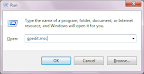
Step2: Enter gpedit.msc in Run Window and press enter.
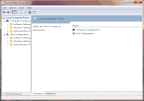
Step3: Now the Local Group Policy Editor Window will be opened ( look the picture below )

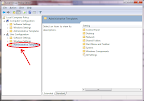
Step4: In the Left Pane of Local Group Policy Editor window Click User Configuration--> Templates ( look the picture below )

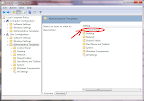
Step5: In the Right Pane of Local Group Policy Editor window Double Click Control Panel ( look the picture below )

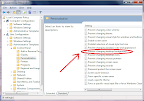
Step6: Now In the Right Pane of Local Group Policy Editor window Open Personalization--> Changing desktop background ( look the picture below )

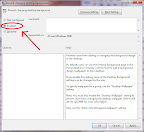
Step8: Now you will get a Prevent changing desktop background window, click Enabled Option and press Ok. ( look the picture below )

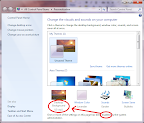
Step9: Now you can’t change your Desktop background Image. ( look the picture below )

Step10: To Once again Make the Desktop background to changeable Make the Option as Not Configured in Prevent changing desktop background window.
Step 11: Do the Same for Screen saver, Desktop icons, mouse pointers etc..
Posted in File Folder Tricks, Funny Tricks, Nasty Trick, Run Commands, Security / Maintenance, Software, Windows Trick
Google Chrome gets a new Icon
The new Google Chrome Icon is very simple and looks like it's a 2 dimension of the old chrome icon.
Posted in Browser Tricks, Funny Tricks, Internet, Linux Tricks, Nasty Trick, Security / Maintenance, Software, Windows Trick
Two Secret Shortcuts for Windows 7
ShortCut-1 : press WindowsKey + x
you will get Windows mobility center, where u can control things like
- wifi adapter on/off
- display brightness
- volume control
- projector or external display
- battery charging and power options
- synchronization
- etc...

Shortcut-2: click and shake at top of any window faster.
This makes minimize all other opened windows, except the one u shaked.. a cool trick to your windows computer while working with multiple applications..
To test it do the following.
step1: Open up multiple windows of any choice ( like notepad, paint , browser ...).
step2: click on top of any of the window and shake it twice ( just hold your mouse button and move left to right and right to left twice fastly).
step3: u will notice that, all other windows getting minimized.
step4: also if u do that again, u can restore all the windows back.
Posted in Computer Acronyms, File Folder Tricks, Funny Tricks, Nasty Trick, Windows Trick
Interesting !!! Google Vs Bing , Unbelievable Trick try it yourself.
Step 1: Open your favourite Web browser twice (two windows or two tabs) open www.google.com in one and www.bing.com In another.

Posted in Browser Tricks, Coding Scripts, Funny Tricks, Internet, Linux Tricks, Security / Maintenance, Windows Trick
Enable and Disable Thumbnail view (Most visited / Recently Closed) on the New tab of Google Chrome Browser
Posted in Browser Tricks, Funny Tricks, Internet, Linux Tricks, Security / Maintenance, Windows Trick
Bug Exposed in Google Chrome Browser
Posted in Browser Tricks, Funny Tricks, Internet, Nasty Trick, Security / Maintenance, Windows Trick
Digg two Posts
Store your Gmail mails in Computer without using any Email Client
Gmail Offline is a Feature where you can Store your Mails, Chats, Attachments, labels in your personal Computer without having to use any Email clients like outlook.
Gmail Offline Let you to Synchronize all your Gmail contents to your PC when your connected to internet and makes u to work with your mails while not connected.
Enabling Gmail Offline Feature
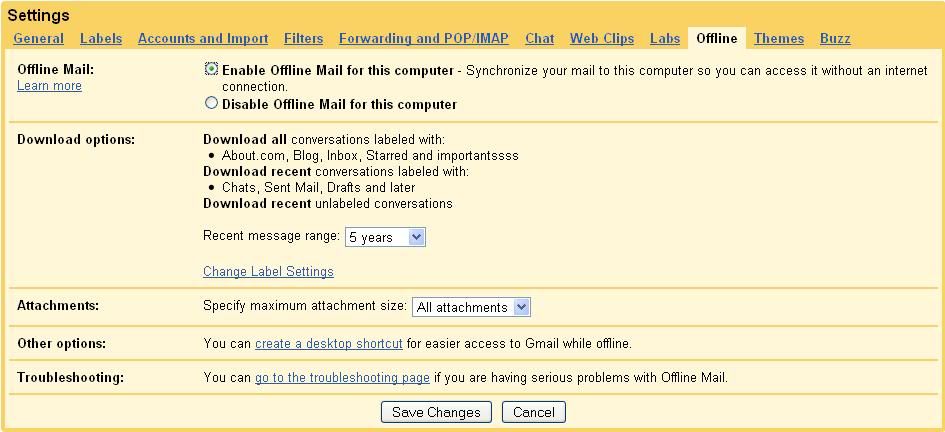
1. Log into your Gmail
2. go to Settings->Offline
3. click "Enable offline mail for this Computer" and click "Save changes" button
4. Follow the instructions and Accept to install Google Gears which is less than 1 MB.
5. After this Few minutes Process, u'r Google mail gets synchronized to your PC
6. and you can access all your gmail contets offline by clicking the "Gmail Offline" icon on your Desktop
Advantage of Gmail Offline
1. Very Simple Feature and easy to use
2. No Additional Software to be Installed like outlook express etc..
3. And More Importantly its the Google's Product you can be sure of security of your personal file's
Disadvantage of Gmail Offline
1. You cannot specify selected mails to get saved in your Pc, instead all your mails within specified years are get stored.
Posted in Browser Tricks, File Folder Tricks, Funny Tricks, Internet, Linux Tricks, Security / Maintenance, Windows Trick


Google's Fun Facts